Discover how RSS podcasts work, why they’re essential for podcast creators, and how you can use them to grow your audience. This ultimate guide covers everything from creating an RSS feed to submission, distribution, and best practices for successful podcasting.
The Ultimate Guide to RSS Podcasts: How They Work and Why You Should Use Them
In today’s digital age, podcasts have become a popular medium for learning, entertainment, and staying updated on various topics. Whether you’re a podcast creator or a listener, understanding the technology behind podcasts is essential.
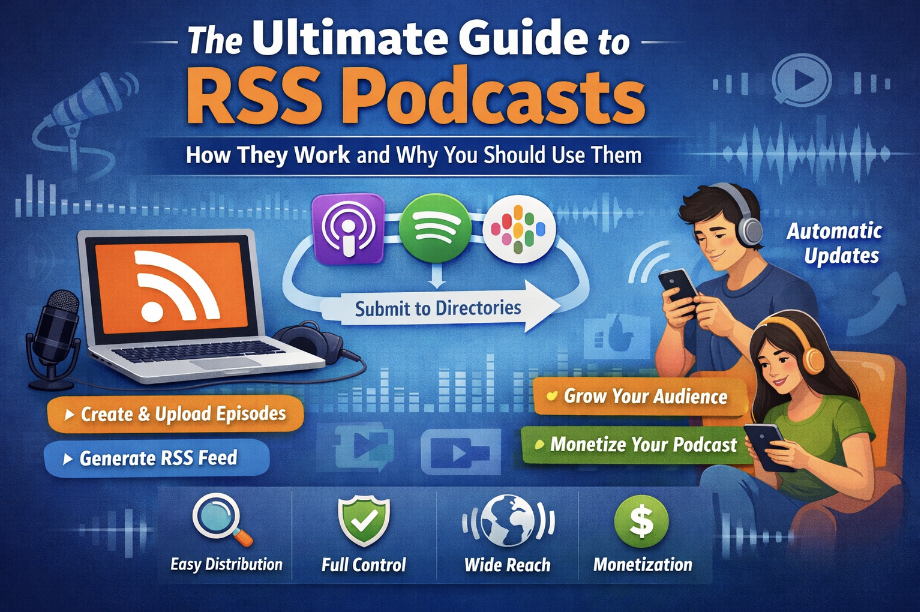
This guide will introduce you to RSS podcasts, explaining how they work, why they are important, and how you can use them to enhance your podcasting experience.
What is an RSS Podcast?
RSS (Really Simple Syndication) is a web feed format used to publish frequently updated content like news, blogs, and podcasts. When it comes to podcasts, an RSS podcast feed is a special type of RSS feed that allows podcast creators to distribute their episodes automatically to listeners. By using an RSS feed, podcasts can be accessed through podcast directories and apps like Apple Podcasts, Spotify, and Google Podcasts.
Key Features of an RSS Podcast Feed:
- Automatic Updates: As new episodes are uploaded, the RSS feed automatically updates listeners’ podcast apps.
- Multimedia Support: It can contain audio, video, and metadata such as episode titles, descriptions, and artwork.
- Subscription-based: Users subscribe to the feed, allowing them to get new episodes automatically.
How Does an RSS Podcast Feed Work?
Step 1: Create Your Podcast
Before setting up an RSS feed, you need to have your podcast ready. This includes:
- Recording episodes: Audio or video content.
- Editing and enhancing the audio: Use audio software to enhance the sound quality and add music or effects.
- Publishing the podcast: After creating the content, you need a platform (like Podbean, Anchor, or Libsyn) to host your podcast.
Step 2: Generate the RSS Feed
Once you’ve uploaded your podcast content to your hosting platform, it will automatically generate an RSS feed for you. Here’s how it works:
- Your hosting platform creates an RSS XML file.
- The feed includes important details about your podcast (title, description, cover art, episode list, and more).
- When you publish new episodes, the RSS feed is updated automatically.
Step 3: Submit Your RSS Feed to Directories
To reach a wider audience, you need to submit your RSS feed to podcast directories like:
- Apple Podcasts
- Spotify
- Google Podcasts
- Stitcher
This process is typically straightforward, and most platforms provide detailed instructions on how to add your feed. Once approved, your podcast will be available on these platforms, and listeners can subscribe to your show.
Step 4: Listeners Subscribe and Listen
Once your podcast is live, listeners can find your podcast by subscribing to the RSS feed on their favorite podcast app. Every time you publish a new episode, your listeners will receive it automatically. This is how podcasts thrive in terms of audience engagement and retention.
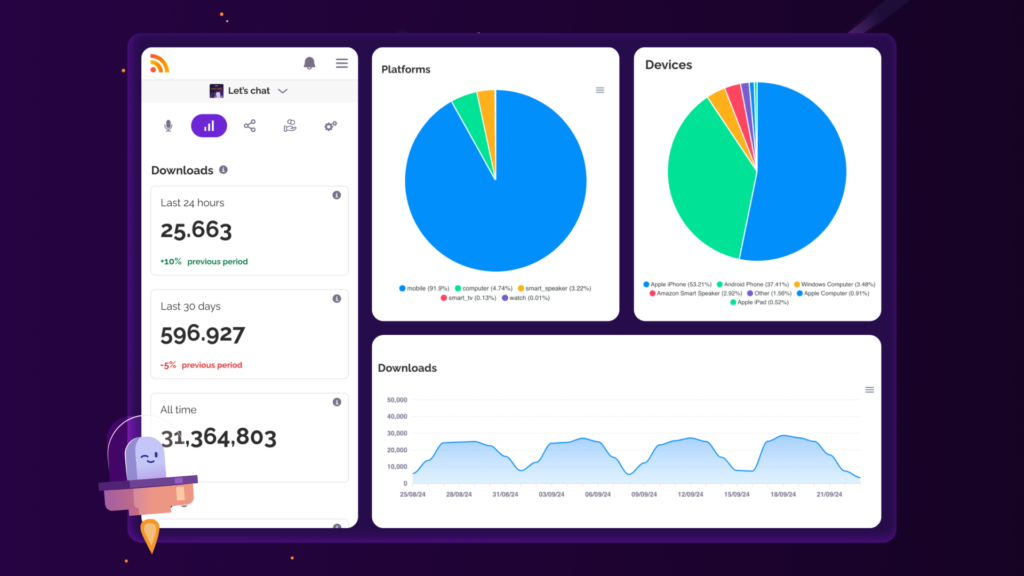
Why Should You Use RSS Podcasts?
1. Ease of Distribution
One of the primary reasons RSS feeds are widely used in podcasting is their ease of distribution. Once your podcast feed is created, all you need to do is update it with new episodes, and your listeners will receive the update on their devices. This automated process saves time and ensures that your audience always gets the latest content without the need for manual distribution.
2. Ownership and Control
Unlike social media platforms or streaming services, RSS podcasts give you full ownership and control over your content. You decide what content goes into the feed, when it gets published, and where it gets distributed. There are no algorithms determining your visibility, and you are not dependent on any third-party platform’s rules or changes.
3. Wide Accessibility
RSS feeds are compatible with most podcast apps and directories, including popular platforms like Apple Podcasts, Spotify, Stitcher, and more. This ensures that your podcast is accessible to a global audience, regardless of the platform they use. RSS is the backbone of podcast distribution, ensuring that your episodes are available on virtually any device.
4. Increased Discoverability
Submitting your RSS feed to major directories increases the discoverability of your podcast. These platforms have millions of users who may stumble upon your podcast while exploring new content. Furthermore, podcast directories often rank podcasts based on subscriptions, reviews, and listening behavior, which means a larger audience is likely to find your show if it’s featured.
5. Podcast Monetization Opportunities
RSS feeds also open doors to various monetization opportunities. You can:
- Offer sponsorships or ads within your podcast episodes.
- Create paid or premium content for your audience.
- Use your RSS feed to distribute exclusive content to paid subscribers.
This flexibility allows podcasters to monetize their content in several ways.
How to Create an RSS Feed for Your Podcast
Creating an RSS feed for your podcast is the first step to making your show available to listeners around the world. Whether you’re a seasoned podcaster or just starting, an RSS feed acts as the backbone of your podcast distribution, ensuring new episodes automatically reach your audience. In this guide, we’ll walk you through the simple process of creating an RSS feed, from recording your episodes to submitting your feed to major platforms like Apple Podcasts and Spotify. Let’s dive in and get your podcast heard!
Creating an RSS feed for your podcast can be broken down into the following simple steps:
Step 1: Choose a Podcast Hosting Provider
To get started, you’ll need a podcast hosting provider. Hosting providers store your podcast files (audio and metadata) and generate the RSS feed for you. Popular podcast hosting providers include:
Libsyn
Buzzsprout
Podbean
Anchor
Once you’ve selected a provider, you’ll need to upload your episodes to their platform. They will automatically generate an RSS feed for you.
Podcast Hosting Providers: A Detailed Comparison
When it comes to hosting your podcast, choosing the right platform is crucial. Each podcast hosting provider offers different features, tools, and pricing plans to suit various needs. Below is a detailed description of the top podcast hosting providers — Libsyn, Buzzsprout, Podbean, and Anchor — followed by an informative comparison table to help you make an informed decision.
Libsyn (Liberated Syndication)
Overview: Libsyn is one of the oldest and most trusted podcast hosting platforms, having been around since 2004. Known for its robust features and reliability, Libsyn caters to both beginners and professional podcasters. It offers flexible pricing plans, detailed analytics, and a user-friendly interface.
Key Features:
- Customizable RSS Feed: Libsyn allows you to fully customize your podcast’s RSS feed, which is ideal for advanced podcasters.
- Monetization Options: Libsyn offers integrated monetization tools, including dynamic ad insertion and premium content options.
- Advanced Analytics: The platform provides detailed analytics, including listener demographics, geography, and episode performance.
- Mobile App: Libsyn’s mobile app helps podcasters manage their shows on the go.
- Global Distribution: Libsyn offers distribution to all major podcast directories, including Apple Podcasts, Spotify, and Google Podcasts.
Pricing: Libsyn’s pricing starts from $5 per month with limited storage, scaling up based on the storage needs. The higher plans offer additional storage and advanced features such as monetization and custom branding.
Buzzsprout
Overview: Buzzsprout is a podcast hosting platform designed for ease of use and rapid growth. It is ideal for podcasters who want to get started quickly and grow their show without worrying about technical aspects. Buzzsprout offers a simple, intuitive interface with high-quality hosting and excellent customer support.
Key Features:
- Easy-to-Use Interface: Buzzsprout’s simple interface makes it easy for beginners to upload and manage their podcasts without any hassle.
- Unlimited Bandwidth: All plans come with unlimited bandwidth, ensuring that your podcast will grow without worrying about storage space or data caps.
- Automatic Episode Transcriptions: Buzzsprout offers automatic transcriptions for each episode, helping you create searchable content for better discoverability.
- Podcast Analytics: Access detailed analytics on listeners, episode performance, and geographic distribution.
- Multiple Integrations: Buzzsprout integrates with major podcast platforms like Apple Podcasts, Spotify, and Stitcher, as well as with tools like Zapier for automation.
Pricing: Buzzsprout offers a free plan with limited features, and paid plans start at $12 per month, with additional storage space and enhanced features like custom branding and transcriptions.
Podbean
Overview: Podbean is a popular podcast hosting platform that offers reliable hosting, monetization tools, and in-depth analytics. With a reputation for scaling with your podcast’s growth, Podbean is suitable for both amateur and professional podcasters. It offers an easy-to-use interface along with robust monetization options.
Key Features:
- Unlimited Hosting: Podbean offers unlimited hosting on its higher-tier plans, which is ideal for podcasters with a growing library of content.
- Monetization: With Podbean’s Ad Marketplace, you can connect with potential sponsors and monetize your content. They also offer a premium content option for paid subscriptions.
- Podcast Website: Podbean provides each user with a customizable podcast website, complete with hosting, branding, and embedded player features.
- Advanced Analytics: Provides in-depth analytics that helps podcasters track listener behavior, engagement, and downloads.
- Live Streaming: Podbean allows podcasters to live stream their episodes and interact with listeners in real-time.
Pricing: Podbean offers a free basic plan, while paid plans start at $9 per month, which includes advanced features like unlimited storage, monetization, and website customization.
Anchor
Overview: Anchor is a free podcast hosting service that has gained significant popularity for its no-cost, all-in-one podcasting solution. Now owned by Spotify, Anchor makes it easy for anyone to create, host, and distribute a podcast without any technical expertise or financial investment.
Key Features:
- Free Hosting: Anchor’s biggest advantage is its free hosting service with unlimited storage and bandwidth.
- Monetization: Anchor allows podcasters to easily monetize their show with ads through the Anchor Sponsorships program.
- Automatic Distribution: Anchor automatically distributes your podcast to major platforms like Spotify, Apple Podcasts, and Google Podcasts.
- In-App Recording: Podcasters can record, edit, and produce episodes directly within the Anchor app.
- Easy Analytics: Anchor offers user-friendly analytics to track performance and audience engagement.
Pricing: Anchor is completely free to use, making it the most cost-effective choice for new and hobbyist podcasters. It generates revenue through its advertising program for creators.
Podcast Hosting Providers Comparison Table
| Feature/Provider | Libsyn | Buzzsprout | Podbean | Anchor |
|---|---|---|---|---|
| Best For | Professional podcasters | Beginners and growth-focused podcasters | Podcasters seeking monetization | Beginners, hobbyists, and cost-conscious podcasters |
| Free Plan | No | Yes (limited features) | Yes (limited features) | Yes (unlimited storage) |
| Pricing | Starts at $5/month | Starts at $12/month | Starts at $9/month | Free |
| Storage/Bandwidth | Limited (based on plan) | Unlimited bandwidth | Unlimited on higher plans | Unlimited |
| Monetization Options | Ads, premium content | Limited ad integration | Ads, premium content, paid subscriptions | Ads through Anchor Sponsorships |
| Podcast Analytics | Advanced analytics | Detailed analytics | Advanced analytics | Basic analytics |
| Distribution | All major platforms | All major platforms | All major platforms | All major platforms |
| Custom Website | No | No | Yes | No |
| Mobile App | Yes | No | Yes | Yes |
| Podcast Website | No | No | Yes | No |
Conclusion
Each podcast hosting provider offers unique benefits suited to different needs and budgets:
- Libsyn is perfect for professional podcasters looking for advanced features, customization, and monetization tools.
- Buzzsprout stands out for its ease of use, making it an excellent choice for beginners and those looking to scale without complexity.
- Podbean excels with its unlimited hosting, monetization opportunities, and live streaming capabilities, making it ideal for podcasters who want to grow their brand.
- Anchor is the go-to free option for hobbyists or those just getting started, with a simple setup and unlimited storage.
Ultimately, your choice will depend on your specific needs, whether it’s affordability, features, or scalability. Evaluate your goals, and select the hosting provider that best aligns with your podcasting vision.
Step 2: Customize Your RSS Feed
While most hosting providers generate the RSS feed for you, you may have the option to customize it. Here are some key elements to focus on:
- Podcast Title and Description: Make sure the title and description are clear and keyword-optimized to help with SEO.
- Cover Art: High-quality, eye-catching cover art is essential for standing out in directories.
- Episode Titles and Descriptions: Each episode’s title and description should be unique and include relevant keywords to improve discoverability.
Step 3: Validate Your RSS Feed
Before submitting your feed to directories, make sure your RSS feed is working correctly. You can use free online tools like Cast Feed Validator to check your RSS feed for any errors or issues.
Step 4: Submit to Podcast Directories
Once your feed is validated, submit it to popular podcast directories such as:
- Apple Podcasts (requires an Apple ID and approval process)
- Spotify
- Google Podcasts
- Stitcher
The submission process usually involves pasting your RSS feed URL into the submission form and waiting for approval. Some platforms may require additional information, such as an email address, podcast category, and a description.
Podcast Directories: A Detailed Comparison
When you create a podcast, getting it listed on popular podcast directories is essential for gaining exposure and growing your audience. These directories serve as platforms where listeners can discover, subscribe to, and enjoy your episodes. Below are detailed descriptions of the four most popular podcast directories: Apple Podcasts, Spotify, Google Podcasts, and Stitcher. We’ll also provide an informative comparison table to help you decide which directories to prioritize for your podcast.
Apple Podcasts
Overview: Apple Podcasts is one of the largest and most influential podcast directories in the world. Launched in 2005, it revolutionized the podcasting industry by making podcasts easily accessible on iPhones and other Apple devices. With a massive global audience, it remains the most important platform for podcasters to be featured on.
Key Features:
- Massive Audience Reach: Apple Podcasts reaches millions of listeners across the globe, especially among iPhone and iPad users.
- Podcast Rankings: Rankings and features on Apple Podcasts are based on user subscriptions, ratings, and reviews, which can significantly boost your podcast’s visibility.
- Customizable Feed: Apple Podcasts allows podcasters to submit custom RSS feeds, which are crucial for managing metadata and episode updates.
- Apple Podcasts Connect: A dashboard where podcasters can manage their show, view analytics, and submit new episodes.
- Siri Integration: Listeners can use Siri to play podcasts, offering an additional way for your audience to engage with your show.
Benefits:
- Trusted by millions of listeners.
- Industry leader and trendsetter.
- Provides detailed podcast performance data.
Spotify
Overview: Spotify, primarily a music streaming service, has become a major player in the podcasting world in recent years. It has rapidly grown its podcast library and now competes with Apple Podcasts as one of the top podcast directories. Spotify allows users to listen to both music and podcasts in one convenient app.
Key Features:
- Integrated Music and Podcasts: Users can easily switch between music and podcasts without leaving the app, providing a seamless listening experience.
- Spotify for Podcasters: This tool gives creators insights into their audience’s listening habits, including detailed analytics and listener demographics.
- Exclusive Content: Spotify has signed exclusive deals with major podcast creators, making it a prominent platform for exclusive podcast content.
- Smart Recommendations: Spotify uses an algorithm to suggest podcasts based on user behavior, making it easier for new listeners to discover your show.
Benefits:
- Large and diverse global user base.
- Enhanced discoverability through smart recommendations.
- Strong podcast analytics and audience insights.
Google Podcasts
Overview: Google Podcasts is a relatively newer platform compared to Apple Podcasts and Spotify, but it has quickly become a significant player in the podcasting world. It’s integrated with Google’s ecosystem, making it easy for Android users to listen to podcasts through their Google account and the Google Podcasts app.
Key Features:
- Google Integration: Google Podcasts integrates well with the Google search engine, allowing listeners to find podcasts directly in search results.
- Cross-Platform Availability: Available on Android devices, and through web browsers, making it accessible to a wide audience.
- Episode Recommendations: Google Podcasts uses AI to recommend episodes based on user interests and listening history.
- Analytics for Creators: Google Podcasts for creators offers insights into listener engagement and performance, although less detailed than other platforms.
Benefits:
- High visibility through Google Search.
- Easy integration for Android users.
- Free, with no subscription required.
Stitcher
Overview: Stitcher is a podcast streaming app that allows users to listen to their favorite shows across a range of devices. It’s popular for its user-friendly interface and its wide range of exclusive podcasts, including both independent creators and big-name shows.
Key Features:
- Podcast Library: Stitcher offers a large collection of podcasts, including exclusive content, and has partnerships with well-known creators.
- Stitcher Premium: A paid service that offers ad-free episodes, early access to content, and exclusive shows for subscribers.
- Recommendations and Personalized Playlists: Stitcher suggests podcasts based on listener preferences and allows users to create custom playlists.
- Monetization for Creators: Stitcher provides monetization opportunities through its ad network, allowing podcasters to earn revenue from ads played in their shows.
Benefits:
- Access to exclusive content through Stitcher Premium.
- Personalized podcast recommendations.
- Monetization opportunities for creators.
Podcast Directories Comparison Table
| Feature/Directory | Apple Podcasts | Spotify | Google Podcasts | Stitcher |
|---|---|---|---|---|
| Best For | iPhone/iPad users, large global reach | Music lovers, younger audience, Spotify users | Android users, Google ecosystem | Exclusive content, personalized playlists |
| Free to Use | Yes | Yes | Yes | Yes |
| Monetization Options | Ads, Sponsorships | Ads, Sponsorships | Limited monetization | Ads, Premium subscriptions |
| Podcast Analytics | Yes | Yes | Basic | Yes |
| Podcast Discoverability | High (based on reviews and rankings) | High (algorithmic recommendations) | Medium (Google search integration) | Medium (personalized playlists) |
| User Experience | Seamless, Apple ecosystem | Seamless, music + podcasts integration | Simple, integrated with Google | Customizable playlists, easy navigation |
| Customizable RSS Feed | Yes | Yes | Yes | Yes |
| Podcast Website | No | No | No | Yes |
| Mobile App | Yes (iOS) | Yes (Android, iOS) | Yes (Android) | Yes (Android, iOS) |
Conclusion on Podcast Directory.
Each podcast directory offers unique features and benefits suited to different needs:
- Apple Podcasts remains the leader due to its massive audience and industry influence, making it a must-listen platform for podcasters aiming for wide exposure.
- Spotify is a great choice for podcasters who want to leverage both music and podcast content, and its powerful algorithm makes discoverability easier for new podcasts.
- Google Podcasts integrates seamlessly with the Google ecosystem, offering easy access to Android users and visibility through Google Search.
- Stitcher provides a highly personalized listening experience, exclusive content, and monetization opportunities, making it a great platform for podcasters focused on loyal, paying listeners.
By submitting your podcast to multiple directories, you can maximize your reach and engagement, ensuring that your content is available to a diverse and global audience.
Best Practices for RSS Podcasting
To make the most of your RSS podcast, follow these best practices:
- Update Consistently: Regularly publish new episodes to keep your audience engaged.
- Optimize Metadata: Use relevant keywords in your podcast title, description, and episode titles to improve searchability.
- Promote Your Podcast: Use social media, email newsletters, and your website to promote your podcast and encourage subscriptions.
- Engage with Your Listeners: Ask for feedback and interact with your audience to build a loyal community.
- Monitor Analytics: Use analytics from your podcast host or directories to track performance and adjust your strategy accordingly.
Popular FAQs on RSS Podcasts
1. What is an RSS Podcast?
An RSS Podcast is a podcast that uses RSS (Really Simple Syndication) technology to distribute audio content (episodes) to listeners automatically. When you upload new episodes to your podcast hosting provider, the RSS feed is updated, and subscribers to the podcast receive the new episodes in their podcast apps. This ensures automatic delivery to listeners without them needing to manually download each episode.
2. How Does an RSS Podcast Work?
An RSS podcast works by:
- A podcast creator uploading episodes to a hosting provider.
- The hosting provider generates an RSS feed that contains metadata (like episode title, description, and artwork) and the media file (audio or video) for each episode.
- Listeners subscribe to the RSS feed through podcast apps (like Apple Podcasts, Spotify, or Google Podcasts).
- When a new episode is uploaded, the feed is updated, and subscribers automatically receive the new episode in their app or feed reader.
3. Do I Need a Website for My RSS Podcast?
No, you do not need a website to create an RSS podcast. Your podcast can be hosted entirely on a podcast hosting platform, which generates the RSS feed. However, having a website or a landing page for your podcast can help with discoverability, provide additional resources (like show notes or episode transcripts), and increase your podcast’s visibility through SEO.
4. How Do I Create an RSS Podcast Feed?
To create an RSS podcast feed:
- Record and Edit your podcast episode.
- Choose a Podcast Hosting Platform (such as Libsyn, Podbean, or Buzzsprout) to upload and store your episodes.
- Generate the RSS Feed by uploading your episode files to the hosting platform. The platform automatically creates and updates the RSS feed.
- Submit the Feed to podcast directories (Apple Podcasts, Spotify, etc.) for wider distribution.
Most hosting providers will take care of the technical details, so you only need to focus on creating and uploading your content.
5. Can I Customize My RSS Podcast Feed?
Yes, many podcast hosting providers allow you to customize your RSS feed. You can adjust metadata such as your podcast title, description, episode titles, artwork, and more. Customization options depend on your hosting provider, but typically you can:
- Modify episode descriptions.
- Add custom show notes.
- Change the podcast artwork.
- Customize the episode sequence.
- Set release schedules for episodes.
These customizations help you maintain branding consistency and optimize your podcast for better discoverability.
6. What is the Difference Between an RSS Feed and a Podcast Hosting Service?
An RSS feed is a standardized file that contains your podcast’s metadata and media links. It’s the distribution mechanism that delivers your episodes to podcast directories and listeners.
A podcast hosting service (like Libsyn, Podbean, or Anchor) is where your podcast files are stored and where your RSS feed is generated. These services handle the technical aspects of podcasting, including:
- Uploading your episodes.
- Generating the RSS feed.
- Distributing the feed to directories.
- Providing analytics and monetization options.
In short, your hosting service generates the RSS feed, but it’s the RSS feed that allows your podcast to be distributed.
7. Do I Own My RSS Podcast Feed?
Yes, you own your RSS podcast feed, which is one of the key benefits of using RSS for podcast distribution. The feed is your podcast’s property, and you can:
- Submit it to multiple podcast directories.
- Switch podcast hosting providers without losing access to your feed.
- Control how your episodes are distributed.
However, note that some hosting providers may have specific terms regarding content ownership or content distribution, so it’s important to review their terms of service.
8. How Do Podcast Directories Use My RSS Feed?
Podcast directories (like Apple Podcasts, Spotify, and Google Podcasts) use your RSS feed to retrieve your podcast episodes and metadata. These directories:
- Fetch the RSS feed to display your podcast’s episodes, title, description, artwork, and other details.
- Sync the feed regularly to show the latest episodes.
- Allow users to subscribe to your podcast, download or stream episodes, and provide reviews.
You only need to submit your RSS feed to the directory once, and after that, it will be automatically updated whenever you upload a new episode.
9. What Should I Include in My RSS Podcast Feed?
An effective RSS podcast feed should contain the following key elements:
- Podcast Title: A clear and descriptive title.
- Podcast Description: A concise description that includes relevant keywords for discoverability.
- Episode Titles: Each episode should have a unique, descriptive title.
- Episode Descriptions: Detailed summaries that include keywords and call-to-actions.
- Episode Media File (Audio/Video): The actual content of your podcast episode (usually an MP3 or other audio format).
- Cover Art: High-quality, eye-catching artwork that complies with the podcast directories’ guidelines (usually 1400×1400 pixels or higher).
- Metadata Tags: Information like episode release dates, episode numbers, and guest details.
Your podcast hosting provider will typically allow you to input this data manually, or it may be auto-filled from your uploaded episode files.
10. How Do I Submit My RSS Podcast to Directories?
To submit your RSS feed to podcast directories:
- Generate your RSS feed through your podcast hosting provider.
- Submit the feed URL to podcast directories (e.g., Apple Podcasts, Spotify, Google Podcasts) by creating an account and pasting the RSS feed link.
- Follow directory guidelines for submission (some platforms may require approval, while others may list your podcast immediately).
- Verify your submission (for example, Apple Podcasts may require you to verify ownership by sending an email to your listed address).
Each platform has specific requirements, so it’s essential to follow their instructions carefully.
11. Why is My RSS Podcast Feed Not Updating?
If your RSS feed isn’t updating, consider the following possible issues:
- Host Server Problems: If there’s an issue with your podcast hosting provider, it could affect the feed’s update process.
- Incorrect RSS URL: Ensure the RSS URL you submitted to directories is correct.
- Delayed Sync: Some podcast directories take time to sync new episodes. Check the feed on different platforms after a few hours.
- File Format Issues: Ensure your audio file format and metadata are compliant with podcast directory guidelines.
If the problem persists, contact your hosting provider’s support team to resolve any technical issues.
12. Can I Monetize My RSS Podcast?
Yes, RSS podcasts offer several monetization options:
- Ad Revenue: Many hosting platforms and podcast directories allow you to place ads in your episodes or use dynamic ad insertion.
- Subscription-Based Models: You can create premium content or offer early access to subscribers for a fee.
- Sponsorships: You can work with sponsors to include their ads in your episodes.
- Crowdfunding: Some podcasters use platforms like Patreon to gain listener support.
Your hosting provider may offer monetization tools, or you may need to seek external partnerships or sponsors.
13. Can I Edit My RSS Feed After Submission?
Yes, you can edit your RSS feed, including episode descriptions, titles, and metadata. However, some changes may require resubmission or reapproval on specific directories. For instance:
- If you change the podcast title or cover art, some directories may need you to re-submit the feed for review.
- Episode details like titles and descriptions can typically be edited without affecting your podcast’s visibility in directories.
Always check with your hosting provider or podcast directory for specific rules regarding feed updates.
14. Is an RSS Podcast Feed Required for All Podcast Platforms?
No, not all podcast platforms require an RSS feed. Some platforms, like YouTube and social media apps, allow you to upload episodes directly. However, an RSS feed is the most efficient and widely accepted method for podcast distribution across multiple platforms and directories, ensuring that your podcast is available to the broadest audience possible.
15. What Are Some Common RSS Podcast Problems?
Common problems podcasters face with their RSS feeds include:
- Broken links: If the media file or episode URL is incorrect.
- Invalid metadata: Missing or incorrect information like episode titles or descriptions.
- Feed not updating: Due to technical issues with the hosting provider or podcast directories.
- Compatibility issues: If the podcast format doesn’t meet directory requirements (e.g., file size, type, or resolution).
Always validate your RSS feed and regularly check it on different platforms to ensure smooth distribution.
By understanding and addressing these frequently asked questions about RSS podcasts, you’ll be better prepared to manage your podcast’s feed, distribute content efficiently, and reach a larger audience. Whether you’re a novice or experienced podcaster, mastering the technicalities of RSS feeds is essential for success in the podcasting world.
Conclusion
RSS podcasts remain the backbone of the podcasting world. By using an RSS feed, you gain control, consistency, and exposure for your podcast while ensuring an easy and automatic distribution process. Whether you’re a creator or a listener, understanding RSS podcasts is crucial to making the most of the podcasting revolution.
Need Help ?
With the right hosting provider, a solid content strategy, and consistent promotion, you can grow your podcast and reach a wider audience than ever before. Start leveraging RSS podcasts today to take your podcasting journey to the next level!
By following this comprehensive guide, you’ll be well on your way to creating and distributing a successful RSS podcast. Happy podcasting!
Discover more from My Advisers
Subscribe to get the latest posts sent to your email.